How to Save Instagram Content for Future Use
Instagram is one of the leading social media platforms in the world, allowing its users to share photos, videos, and stories. However, there may be times when you come across stunning content that you wish to save for later. Whether it is an inspirational quote, a beautiful landscape photo, or a hilarious video, knowing how to save Instagram content can greatly enhance your social media experience. In this article, we will explore different methods to save Instagram content effectively.
Why Save Instagram Content?
There are numerous reasons why saving Instagram content might be beneficial. Here are some of the most common ones:
- Personal Inspiration: Many users save posts that inspire them, whether for fashion, fitness, or personal projects.
- Creative Projects: Artists and designers often save content that serves as reference material or inspiration for their own work.
- Memorable Moments: Users may wish to preserve memories by saving special posts related to friends, family, or events.
- Educational Resources: Many users share tips and tutorials; saving these posts can create personalized reference materials.
Methods to Save Instagram Content
1. Using Instagram’s Built-In Features
Instagram offers a few built-in features that help you save content directly on the platform:
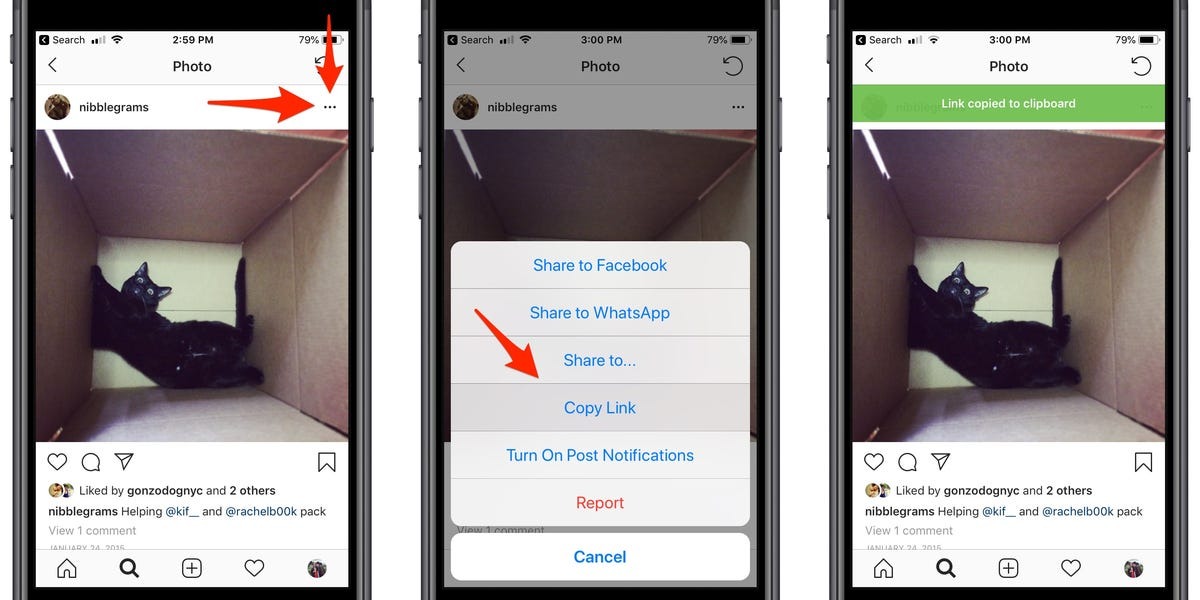
- Bookmarking Posts: When you find a post you’d like to save, tap the three dots in the upper right corner and choose «Save.» This will add the post to your collection, which you can access via your profile.
- Saving to Collection: Instagram allows you to create collections of saved posts for better organization. You can create a new collection when saving a post and categorize it according to your preferences.
2. Taking Screenshots
A simple and effective method to save content is by taking screenshots. This method is universal as it can be used across various devices:
- For iPhone, press the side button and the volume up button simultaneously.
- For Android, the combination often involves the power button and the volume down button.
- To make screenshots more organized, consider creating a specific album in your photo gallery for all Instagram screenshots.
3. Utilizing Third-Party Apps
There are various third-party applications available that help to download Instagram content. Some popular apps include:
- Repost for Instagram: This app allows you to repost photos and videos while giving credit to the original user.
- Story Saver: This app is great for downloading Instagram Stories. Simply enter the username, and you can save the stories to your device.
- SaveStory: This tool allows you to save both stories and highlights from Instagram. It’s user-friendly and designed specifically for this purpose.
4. Downloading via Web Browsers
If you prefer using a computer, you can save Instagram content through web browsers:
- Open the Instagram post in your browser.
- Right-click on the image or video and select «Save Image As…» or «Save Video As…».
Note that this method may not always work for stories, as they are usually only available for a limited time.
Best Practices for Saving Content
While saving content, it’s important to remember some best practices:
- Respect Copyright: Always respect the copyright and personal rights of the original content creator. Do not use saved content for commercial purposes without permission.
- Give Credit: If you share saved content on your own account, make sure to tag the original creator.
- Organize Your Saved Content: Whether you are using Instagram’s features or storing screenshots, a well-organized library makes it easier to find what you’re looking for.
Conclusion
Saving Instagram content is not only easy but also a great way to curate inspiration and memories. Whether through built-in features, screenshots, or third-party apps, there are numerous methods available to ensure that you have access to your favorite posts whenever you need them. By following best practices and respecting creators’ rights, you can enhance your Instagram experience and create a personal library of content that resonates with you. Embrace the digital age and start saving your favorite moments today!